
Forum rules - please read before posting.
How to set the use action to the E key?

Hi, this maybe a dumb question, but I can't seem to find a simple solution. In my First Person game, I want to have the keyboard E key mapped to the Use action: how can I do that?
Howdy, Stranger!
It looks like you're new here. If you want to get involved, click one of these buttons!
Quick Links
Categories
Welcome to the official forum for Adventure Creator.
Comments
Welcome to the community, @PinoEire.
You can do this by defining an input named "InteractionA" in Unity's Input Manager, and setting its Positive Button field to e.
To prevent mouse-clicks from working as well, uncheck Mouse clicks have default functionality? in the Settings Manager.
More details on this topic can be found in the Manual's "Mouse and keyboard input" chapter.
@ChrisIceBox Any chance you can give me a pointer? Or is my only option to edit the character input script?
No scripting need be involved - I'm referring to Unity's Input Manager which can be found under "Project settings -> Input" in the top toolbar:
https://docs.unity3d.com/Manual/class-InputManager.html
Increase the number of axes at the top by 1 to create a new input, then set the new input's Name to Interaction A, and Positive Button to e.
Now I feel like an idiot Thank you, @ChrisIceBox, for answering
  BTW, Is the new Input System going to be natively supported? I saw an integration package, but it didn't work as expected.
The one on the Downloads page? What issues did you have?
I had to keep both systems in parallel because of mouse input calls in AC, so it didn't make much sense to have both systems active at the same time.
Sorry, can you elaborate? Mouse input should be overridden with the integration script, along with other input calls.
It should be the case that you can rely on the new input system alone - can you share steps that cause that to not be the case?
Sure, I will implement the new system again this weekend and get back with the results. Thanks for helping
Hi @ChrisIceBox,
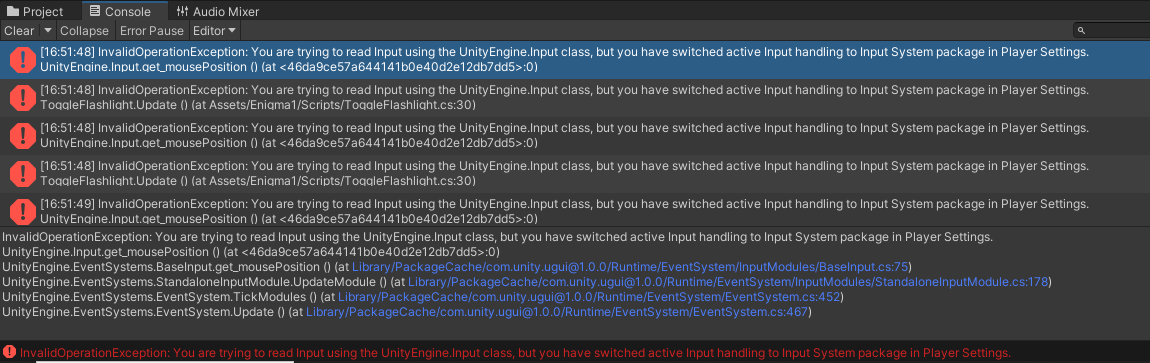
I have put the New Input System in the game, and this is what I get:
As a result, none of the mouse command work, and the UI cannot be used because the mouse click is not detected either
The error message is coming from Unity's Standalone Input Module, via the EventSystem GameObject.
If there is no EventSystem in your scene, then AC will automatically generate one. You can override this, however, at the top of the Menu Manager.
Create a new Event System by choosing GameObject -> UI -> Event System in the top toolbar, and then click the Replace with InputSystemUIInputModule Button that appears in its Standalone Input Module's Inspector. This will convert it to an Input System equivalent.
Then, make this new Event System a prefab, and assign the prefab into the Event system prefab field at the top of the Menu Manager.
Indeed this step makes the errors go away, but now popping up the menu while a dialogue is playing, it makes it all out of sync when resuming. Also, the first-person player is not rotating with the mouse, even having the actions added. I suppose there are fixes for that as well? I guess the Inpyt System manual should be improved. for now, I'll go back to the legacy system, which works fine.
I'd be glad to update the Readme with more details, and improve the package with fixes, but I will need to know more about the issues you're facing.
Are you referring to pausing the game mid-speech, and in what way do things become out of sync? If you have steps that can be used to recreate the issue, please share them.
I'll attempt a recreation, thank you.
First-person free-aiming is handled through the CursorHorizontal and CursorVertical inputs - can you share screenshots of how these are set up in your Controls asset?
Hi @ChrisIceBox ,
I have removed the package already. Please give me a couple o days: I will create a GitHub private repo with a reproduction environment that will allow working on these issues without affecting the game development. Please let me know your GitHub handle (by email or DM), so I will add you to the repository.